

What Is the Kits AI Stem Splitter and Who Is It For?
If you make edits, remixes, karaoke tracks, or just want a clean acapella to sample, you need a stem splitter. Kits AI has one built in. It pulls a mixed track apart into separate pieces so you can work faster and cleaner.
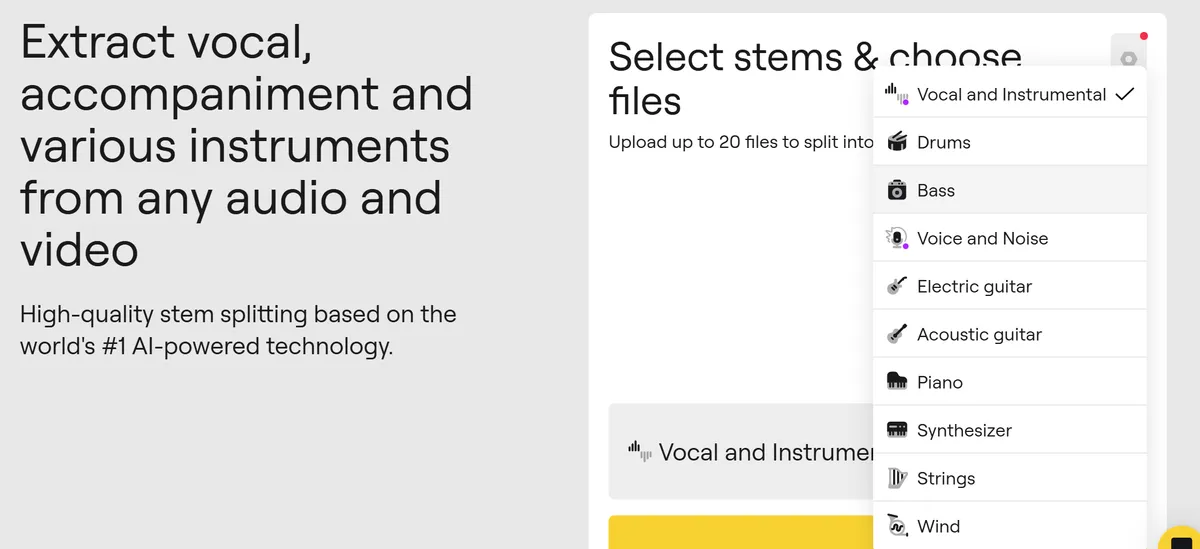
Kits AI splits four core stems, vocals, drums, bass, and other instruments. You can upload a track, preview separation for free, and hear each stem before you commit to a download. Source: Kits AI Stem Splitter
Who is it for? Honestly, a lot of people:
- Producers and DJs who want quick acapellas, instrumentals, or DJ edits
- Creators making UGC, TikToks, and YouTube shorts at scale
- Educators and students doing ear training or mix analysis
- Podcasters who need cleaner voice tracks without heavy mixing
- Session players practicing along with clean drums or bass
Kits AI is part of a bigger vocal suite. Beyond stem splitting, you get voice cloning, AI singing voices, and AI mastering in one place. That matters if you want an end‑to‑end vocal workflow inside a single tool.
Kits AI Stem SplitterFeatures, Pricing Model, Pros and Cons
Before we stack it against LALAL.AI and Moises, let's pin down what Kits actually gives you.
Core capabilities
- Stems: vocals, drums, bass, and other instruments
- Preview: free, unlimited previews so you can hear quality before downloading
- Export: download stems when you're happy with the split, choose common formats like WAV or MP3 based on your workflow
- Quality tips: start with the highest quality source you can, clean WAV or high bitrate MP3 will usually separate better than a clipped, over‑limited file
The free plan lets you audition stems without download limits, which is perfect for testing mixes or checking if a track separates well. Source: Kits AI Stem Splitter
Pricing model
Kits offers straightforward plans. As of writing, Starter is $10 per month with unlimited conversions, 2 voice slots, and 15 download minutes. Producer is $30 per month with unlimited voice slots and 60 download minutes. Professional is $60 per month with unlimited downloads. Always check the official pricing page for the latest details. Source: Kits AI Pricing
✅ Pros
- Integrated vocal suite, stem split, voice cloning, and mastering in one place for end‑to‑end vocal workflows
- Free, unlimited previews so you can judge quality before paying for downloads
- Simple web workflow, no plugins needed, quick to get a solid acapella
❌ Cons
- Only 4 stem types, some rivals offer more detailed instruments or models
- Download minutes on lower tiers can run out if you batch long tracks
- Always double‑check licensing and privacy terms before commercial use
Kits AI vs LALAL.AI vs MoisesSidebySide Comparison
Here's the direct comparison. I'm blunt about this because it helps you choose fast.
Quick take
- LALAL.AI: strongest, most consistent vocal isolation in my tests, and flexible multi‑stem options. It's my pick if clean vocals are mission‑critical.
- Kits AI: best if you want an all‑in‑one vocal workflow in one account, not just separation.
- Moises: great for practice, mobile, and musician tools like chord detection, tempo, and pitch control.
| Feature | Kits AI | LALAL.AI | Moises |
|---|---|---|---|
| Stems offered | 4 core, vocals, drums, bass, instruments | Multiple stem types, strong vocal/instrument options | 4-6 stems depending on mode, plus musician tools |
| Vocal quality consistency | Good for quick splits | High, my top pick for clean acapellas | Good, tuned for practice use |
| Batch tools | Manual web workflow | Credit packs and batch‑friendly flows | Mobile and web, project‑oriented |
| Workflow focus | End‑to‑end vocal suite | Separation quality and flexibility | Practice, tempo/pitch tools, mobile first |
| Pricing model | Subscriptions with minutes and unlimited tiers | Credit packs and subscription options | Free tier plus subscription upgrades |
| Best for | Creators who want voice tools + stems together | Producers and editors who need clean vocals | Musicians and educators practicing songs |
How to Use Kits AI Stem Splitter (StepbyStep)
Here's the fastest clean split workflow I've found on Kits. It's simple, and it's repeatable.
- Step 1: Prep the best source - Use the highest quality audio you have. Avoid heavy limiting and crushing loudness. Cleaner in, cleaner out.
- Step 2: Upload and pick stems - Drag your track into Kits AI, choose stem splitting, confirm you want vocals, drums, bass, and instruments, then let it process.
- Step 3: Preview, tweak, export - Solo each stem, listen for bleed, then re‑run if needed. When it's right, export in WAV for production or MP3 for quick social edits.
Quality and cleanup tips
- Vocal polish: if there's a bit of background bleed, try a gentle noise gate and a light de‑noise. A narrow EQ dip around clashing cymbals often clears space.
- Align stems: if transients feel off, nudge stems so drums hit exactly on grid. Tight timing masks small artifacts.
- Mix safe: avoid stacking heavy reverb post‑split. Artifacts hide better in drier vocals.
Buyer's GuideChecklist for Choosing an AI Stem Splitter
Run every tool through this quick checklist. You'll know in five minutes if it fits your workflow or not.
- Quality vs speed: is the vocal clean enough for your use, and how fast can you process a batch?
- Stems and models: do you get the stems you need today, not just a generic 4‑way split?
- Limits and formats: check file size caps, supported formats, and export choices for your DAW.
- Licensing and cost: confirm commercial use terms and the true monthly cost at your volume.
If you're building a content pipeline, also think about automation. Watch folders, batch exports, and API access are not nice‑to‑haves once you scale. They are the difference between one‑off wins and a reliable system that runs while you sleep.
Recommendations and Next Steps (Including Automation Ideas)
Here's my honest take after living with these tools:
- LALAL.AI is my top pick for consistent vocal quality and flexible stem types. If the acapella must be clean, start here.
- Kits AI wins if you want an all‑in‑one vocal stack. Stem split today, voice clone or AI sing tomorrow, master inside the same account.
- Moises is the best practice companion. The mobile app, tempo and pitch tools, and chord displays are clutch for musicians and teachers.
Automation ideas that save real time
- Batch jobs: group tracks by length, run in off‑hours, and log which ones need a second pass.
- Folder‑based processing: keep a "To Split" folder on your desktop. When stems export, auto‑rename and sort into Vocal, Drums, Bass, Instruments folders.
- DAW templates: pre‑load EQs and gates for the vocal stem and a drum transient shaper that you can toggle on when needed.
- Scale your outputs: render a clean acapella, a -6 LUFS instrumental, and a short hook loop for socials in one session.
If you want the simplest decision flow, do this. Need the cleanest acapellas across many genres, use LALAL.AI. Want a single account to handle separation plus modern vocal tools, go with Kits AI. Live on your phone and teach or practice daily, use Moises. That's the map.
Pricing and free preview details for Kits AI from the official pages: Kits AI Stem Splitter and Kits AI Pricing. Always verify current terms before you buy.