

What "Best" Means for AI Interior Design (Start Here)
"Best" depends on the job. I split interior work into four buckets: photo-based restyles, layout and floor planning, photorealistic staging, and quick style variations. Different tools crush different jobs. One model will not cover it all with the same quality, control, and cost.
Pick the right job before you pick the tool
- Photo reimaginers: Edit an existing photo to change decor and furniture while keeping the room structure. Best fits Fal.ai Nano Banana Pro Edit and tools like RoomGPT.
- Layout and floor planning: 2D and 3D plans, furniture footprints, and traffic flow. Planner5D and Aitwo beat image models here.
- Photorealistic staging: Make a real space look sell-ready with realistic lighting and shadows. Fal.ai with precise masking wins.
- Quick mood/style variants: Fast before-and-after ideas from a single photo. RoomGPT, Spacely AI, Visualize AI are fun for speed.
How I judge these tools
- Photorealism: lighting, shadows, reflections, and texture that feel real.
- Edit control: mask and brush for local edits, not just full image swaps.
- Output resolution and speed: can I get 2K or better, without waiting forever.
- Price per image: predictable, low per-edit cost beats a big monthly fee for casual use.
- Rights and watermarks: is there a visible watermark, do I have usage rights for listings or client work.
- Daily limits: when I'm in a flow, caps kill momentum.
Who you are matters. Renters want fast restyles. Designers need control and rights. Realtors care about photorealistic staging. DIY owners want budget and ease. For photo restyles, Fal.ai Nano Banana Pro Edit is my top pick on realism and control. For layouts, planners like Planner5D and Aitwo are better than any image model.
- Define the job first. Restyle a photo, plan a layout, or stage for realism.
- For photo edits with control, pick a tool with masking and 2K output.
- Per-edit pricing can be cheaper than a monthly subscription if you only run a few images.
If you want to automate repeat tasks, batch prompts, and build workflows, check our best AI agents guide from Most Agentic. It pairs perfectly with the tools below for sourcing, batching, and shopping list automation.
Quick Picks: Best AI Interior Design Tools by Use Case
- Photorealistic photo restyle, top pick: Fal.ai Nano Banana Pro Edit. Fast, clean masking, 2K+ output, low per-edit cost. It preserves architecture and nails lighting, so results look real.
- Totally free trial path: Google Gemini with the Thinking model. Great for trying ideas. Expect lower resolution, visible watermarks, and strict daily caps unless you upgrade. Gemini
- Layout and floor planning: Planner5D for easy 2D and 3D, or Aitwo for quick layout iteration. Better for space decisions than image-only generators.
- Quick style variants from one photo: RoomGPT, Spacely AI, Visualize AI. Rapid restyles for ideation, but less control over specific items.
- Manual brush and mask without pro tools: Collov. Draw-on-image editing for localized changes when you need precision.
Tutorial: Redesign a Room for ~$0.15 Using Fal.ai (Nano Banana Pro Edit)
I'll show you the exact steps I use. This takes five minutes the first time. After that, two minutes flat. I use Fal because I can get 2K+ edits, precise masking, and reliable realism for around $0.15 per edit depending on settings. You can test a free alt in Gemini if you just want quick ideas with lower res.
Step 1, prep your photo
- Shoot in daylight or even lighting. Avoid strong backlight.
- Hold the phone level. Stand back to capture the full wall and floor.
- Tidy clutter. Messy photos confuse the model.
- No people. It avoids privacy issues and weird artifacts.
Step 2, open Fal and upload your "before" photo
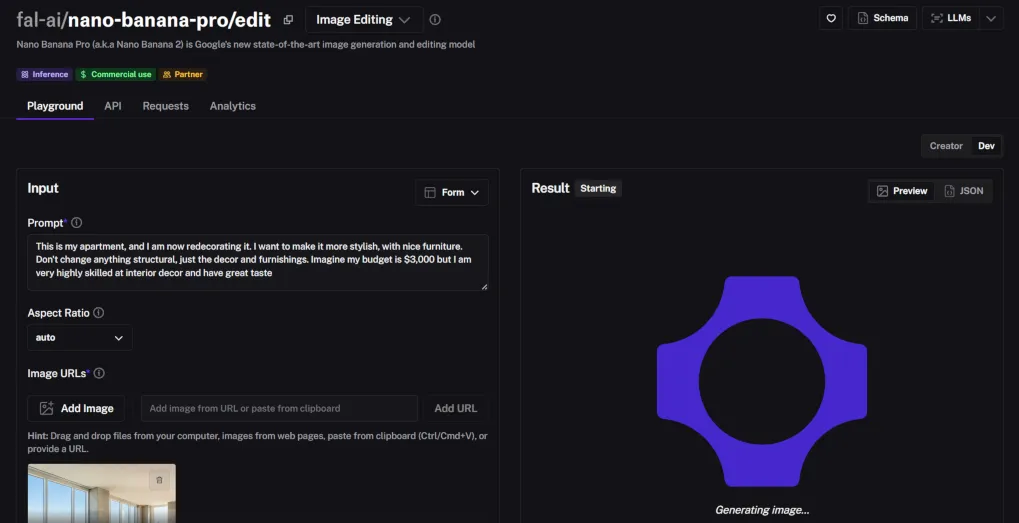
Create an account on Fal, then open the Nano Banana Pro Edit playground. Here is the editor I use for interior photos.
Fal Nano Banana Pro Edit Playground
Upload your room photo. If you want to practice first, you can generate a blank room image and then restyle it.
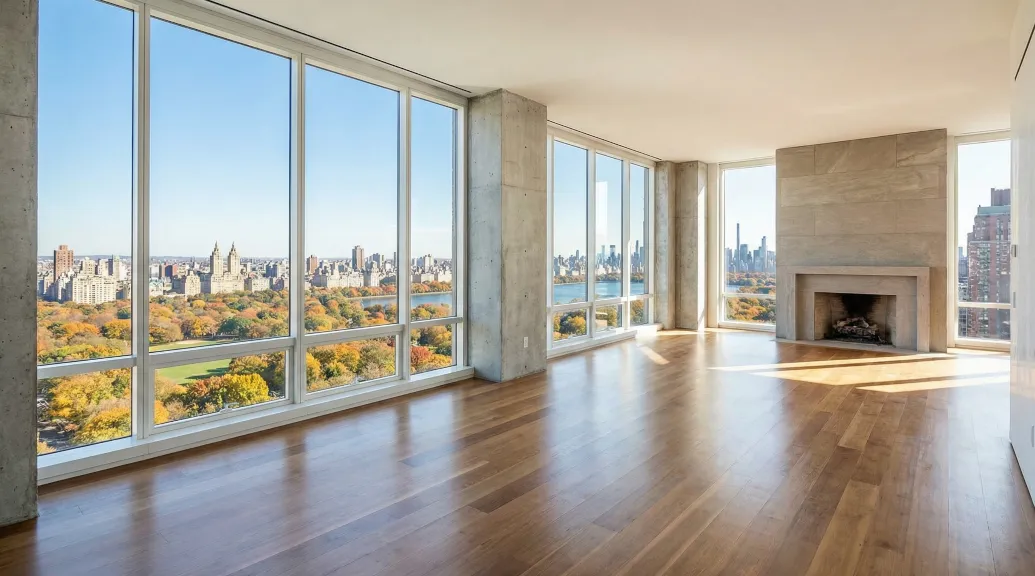
Here is the test prompt I used to create a clean "before" image:
Generate a realistic photo of an apartment penthouse, unfurnished, with Central Park in the background.
Step 3, use my prompt formula
I paste this prompt into Fal Nano Banana Pro Edit. It keeps structure and upgrades the decor.
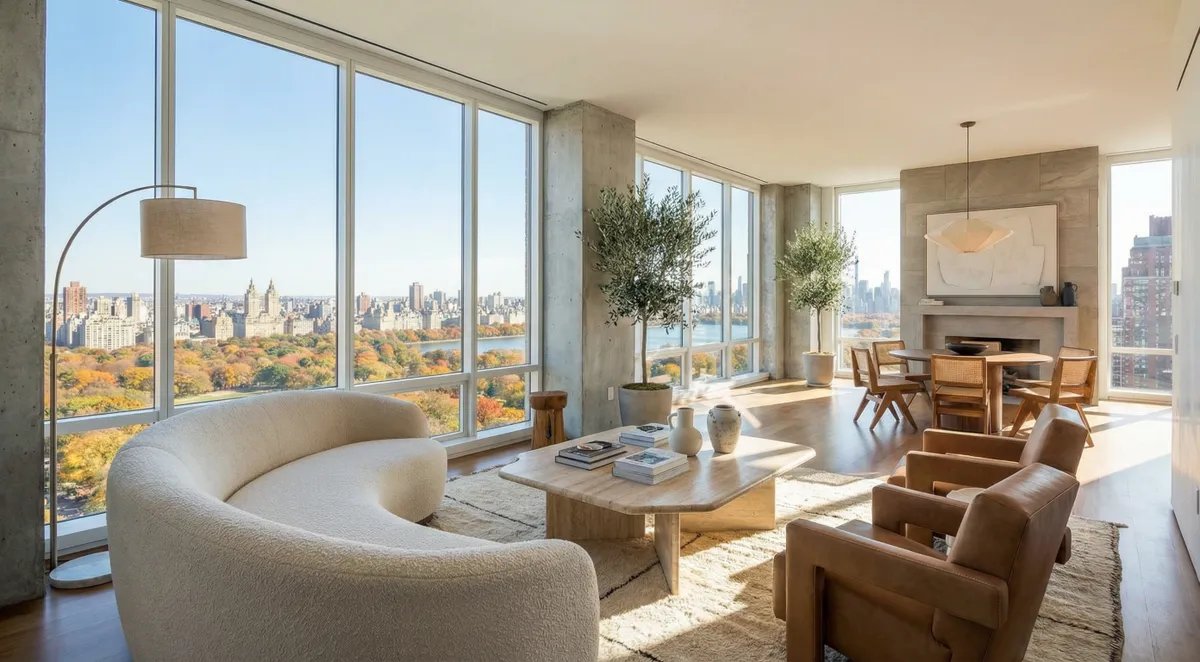
"This is my apartment, and I am now redecorating it. I want to make it more stylish, with nice furniture. Don't change anything structural, just the decor and furnishings. Imagine my budget is $3,000 but I am very highly skilled at interior decor and have great taste."
Step 4, mask for control
Use the brush to protect windows, walls, and floors. Let the model change furniture, textiles, art, and lighting. This is where Fal shines. It gives you local edits without wrecking the bones of the room.
Step 5, generate 2 to 3 variations
Run a few options. Pick the one with the most natural shadows and reflections. Rerun if the rug or sofa scale looks off.
Step 6, export at 2K+ and save your favorites
Download at 2K or higher. Save all variations in one folder. Note what you love, like the coffee table shape, the rug texture, the wall art palette. These details help you source real products later.
Free alternative with Gemini
If you want to test ideas for free, use Gemini and select the Thinking model for image generation and editing. Expect lower resolution around 1 MP, a visible watermark, and tight daily caps. You can still learn what style you like. Then move to Fal when you need 2K+ and no visible watermark.
Fal vs Gemini vs RoomGPT vs Planner5D vs Collov vs Spacely vs Aitwo
I care about two things, realism and control. Price is third. Here is the no-fluff take so you can choose in minutes.
Photo restyle and staging tools
| Feature | Fal.ai Nano Banana Pro | Gemini | RoomGPT |
|---|---|---|---|
| Best for | Photorealistic restyles with masking | Free idea testing, quick concepting | Fast style variants from one photo |
| Edit control | Precise mask and brush, local edits | Limited, less precise edits | Global restyles, minimal local control |
| Photorealism | High, strong lighting and shadows | Good for ideas, not always consistent | Varies, often stylized |
| Output | 2K+ export | Lower res on free, watermark visible | Web-size, varies by plan |
| Cost | Per-edit around $0.15 depending settings | Free trial, upgrade removes limits | Freemium, paid tiers for higher quality |
| Speed | 1 to 2 minutes for 2 to 3 variants | Fast, but capped | Fast single-click restyles |
Layout and precision edit tools
| Feature | Planner5D | Aitwo | Collov |
|---|---|---|---|
| Best for | 2D and 3D space planning | Layout iteration and options | Manual brush and local changes |
| Edit control | Plan-level changes, furniture footprints | Rapid layout variants | Draw-on-image precision edits |
| Photorealism | Good 3D visualization | Layout-first, less about photorealism | Depends on source photo, decent for local swaps |
| Output | 2D plans and 3D views | Plan and layout outputs | Edited photo exports |
| Cost | Freemium with paid upgrades | Freemium or per-plan pricing | Freemium with paid for advanced |
✅ Pros
- Fal Nano Banana Pro delivers realistic lighting, texture, and shadows that look like a real shoot.
- Mask and brush keep your architecture intact, so windows, doors, and floors do not warp.
- Low per-edit cost is perfect for renters, realtors, and designers who do not want a big monthly bill.
❌ Cons
- Any image model can hallucinate if you do not guide it. Describe structure first.
- Room-only tools like RoomGPT are fast but light on precision.
- Layout planners are not photorealistic. They solve a different problem.
Pricing, Rights, and Limitations (Avoid Gotchas)
Free is not really free if you need clean results for clients or listings. Here is what actually matters so you do not get burned.
- Free vs paid: free tiers often cap daily usage, limit resolution around 1 MP, and add visible watermarks. Paid tiers lift caps and remove the visible watermark. Details are vendor specific.
- Commercial rights: check the license. Some free outputs are personal only or include visible watermarks that are not OK for pro use.
- Privacy: only upload photos you would be fine sharing. Many platforms store images or use them to improve models. Use privacy controls if available.
- Budget planning: if you only need a few restyles, per-edit pricing is cheaper than a monthly plan. If you run dozens a week, a subscription may win.
How to Choose Fast (1-Minute Checklist)
- Have a room photo and need photoreal decor? Use a photo editor with masking. Fal Nano Banana Pro Edit is my pick for control and 2K output.
- Need to plan space and flow? Use a planner like Planner5D or Aitwo, not an image editor.
- On a $0 budget? Test in Gemini or freemium tiers like RoomGPT or Spacely. Accept lower res and watermarks.
- Want speed over control? RoomGPT or Spacely. One click, instant vibes.
- Care about rights and no watermark? Pay on the platform you will use most.
- Automation angle: Pair your tool with AI agents to batch style variants, organize sources, and auto-generate shopping lists. This saves hours when you are testing 10 looks at once.
- Fal.ai Nano Banana Pro Edit is the best photo-based restyle tool for realism and control.
- Planner5D and Aitwo beat image models for layouts and floor plans.
- Use Gemini's free path to explore ideas, then switch to Fal for clean 2K exports.
Why Fal Nano Banana Pro Works So Well
It is not just speed. The model understands interiors. It preserves windows and doors when you describe the structure first. It respects materials. It handles golden hour lighting without making the room look fake. It does context-aware edits, like swapping furniture and changing the mood with believable shadows and reflections. In practice, this saves me from Photoshop cleanup. It is the difference between a fun demo and a real deliverable.
I have also used Nano Banana to turn rough floor plans into furnished visualizations. It keeps layout details and adds texture, fabrics, and shadows. That is huge early in a project. For quick ideation, I start with Nano Banana for speed, then promote the best ones to Nano Banana Pro for polished, high-resolution results.
Real talk. My first runs were messy because I let the model change everything. The fix was simple, protect the structure with a mask and be clear in the prompt that only decor can change. After that, results clicked.