

What is vibe coding (and why your first prompt makes or breaks the build)?
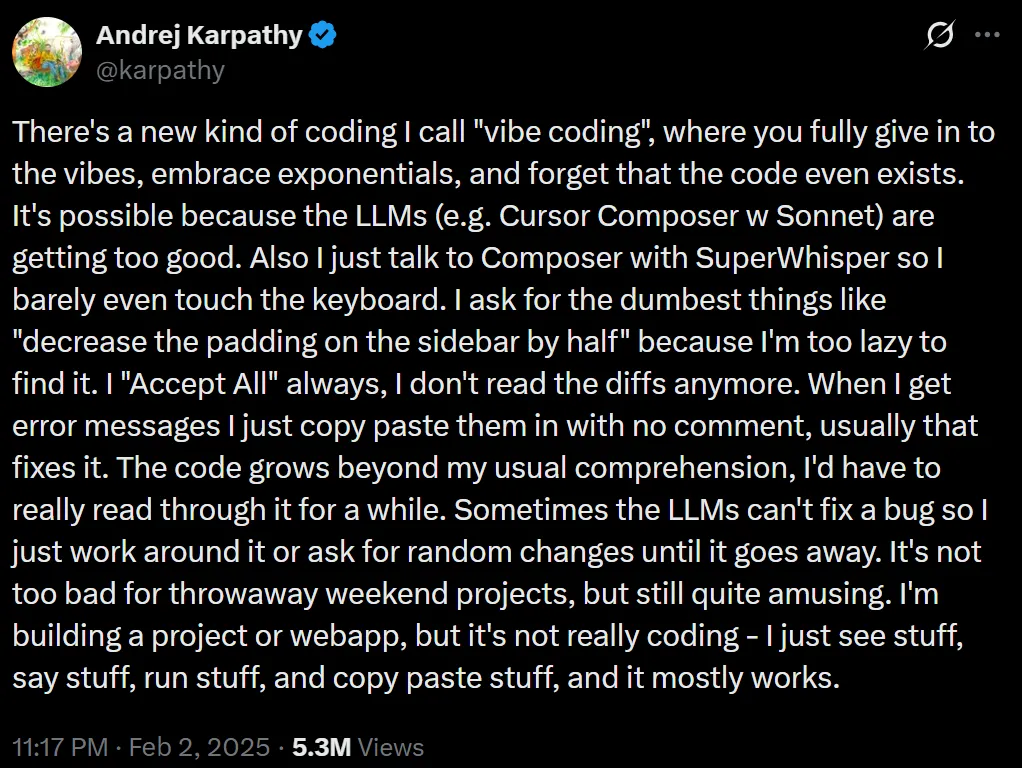
It's been about a year since vibe coding went mainstream. Andrej Karpathy popularized the term in Feb 2025, and even posted about it on X that month. By the end of 2025 it showed up on big dictionaries as a trending term. Wild. But what actually is vibe coding?
Two details matter. First, the model is very sensitive to your opener. Scope, tone, constraints, even the vibe of your instructions, they all stick. Second, vibe coding isn't just using an LLM for autocomplete. You accept AI‑generated code without fully understanding every piece. That's why the spec and guardrails in your first message are everything.
Get the opener right, your session cruises. Get it wrong, you'll see drift, bugs, and weird style mismatches. I've had sessions collapse in 15 minutes because I let the model over‑specify files or I mixed infra decisions into UI planning too early. Tokens burned, repo messy, patience gone.
"The hottest new programming language is English."- Andrej Karpathy
Context for the skeptics. Karpathy framed vibe coding as great for throwaway weekend projects or low‑stakes tests. That tracks with my experience. You can push it further, but only if your prompt is rock solid and you keep the flow tight.
The ultimate vibe code prompt (copy/paste and start building)
I've tested dozens. This is the prompt I still use when I want a clean React MVP with HTML and vanilla CSS. It forces a simple spec first, then we code. Paste this as your opening message.
=====================
I want to code a React app, in HTML and vanilla CSS, possibly using external APIs and Firebase.

I now need you to help me prepare a detailed summary of my app, including an overview of the frontend design page and overview of how the backend will work.

I have already prepared a very rough description of the app, as follows:

------------------------------
{user-input}
------------------------------

However, as you can see this is a very brief description.

I now want you to write a more expansive app spec.

This description does not need to be too detailed, perhaps between 100 and 500 words.

You do not need to write in massive amounts of technical detail (all this information will be supplied again later for us to prepare a final coding plan).

I just want you to expand on the spec, and write it in plain English.

In particular here are the aspects to include in your summary:

## App Summary ##

Write an overview of the application - what it does, core functionality, pages, backend files. This should perhaps be 1-3 paragraphs long.


## Front-End Design & Structure ##

Crucially, I want you to describe the front-end design in a bit more detail, mapping the pages and core functionality, page by page.

The app must be coded in React, and must be between 1-5 pages in total. Since this is a simple app try to include core functionality that can be included on 1-3 pages. If more pages are needed, you can reference them briefly, in less detail.

This front-end design section may be the longest part of your summary, perhaps 2-6 paragraphs long. It can talk in detail about the main page, but also describe briefly how the other pages should be structured.

You do not need to reference the style (font, colors, etc), but you should definitely describe the overall structure of the site and each page (using the attached image as reference).

The design is one area where you can riff a little and make suggestions about the pages, their structure and the layout that were not in the initial user rough description.


## Backend, Services & API ##

You may also want to discuss the backend and how it maps to these particular pages - depending on the app we might need to integrate some APIs to provide the core functionality required.

You may be aware of APIs that could be involved in this project, but do not include too much technical details - perhaps a general plain-English overview with light code snippets and between 1-3 paragraphs of the core API calls needed for each page of the app.

You may also want to brief touch on the Firestore database, and what content should be stored on each page (note this is a single user app with anonymous login as we are only building an MVP to start).

IMPORTANT: No sign-up or login UIs are required; think of it as a single invisible user behind the scenes. We only sign in once anonymously.

Also, not every MVP needs persistence, so feel free to skip Firebase entirely if your feature can live on a single page.


## IMPORTANT ##

Do not go too much into the weeds with this summary. Do not suggest specific filenames or folders. Your description should flesh out the rough description, hinting at APIs and libraries needed, and forming an opinion on the overall tech stack and architecture - but it MUST be written in plain English, NOT code snippets. It should read like a 1-2 page summary written for a product manager to interpret and build on, not a tight technical doc that limits future plans.

Remember we are going to write a detailed coding session later - but for now we want to keep it simple.

Now return the expanded app description.

This should be something a normal person can understand, but with enough technical terms that a well-versed LLM could in theory immediately turn into a coding plan.

Now return the expanded, detailed spec for the user's app.
=====================Toggle Firebase and API mentions based on your MVP. If your feature lives on a single page, skip persistence. If you need saved state or offline cache, include Firebase but keep it anonymous and invisible. Don't add auth flows until you actually need them.
Prompt breakdown: how each section keeps your session on‑track
I'll keep this simple. Here's how each part of the vibe code prompt keeps the model pointed at the right target.
App Summary
This aligns the model to the product vision before any code. You're asking for a plain‑English overview of what the app does, the core features, and the pages. That clears up scope and MVP boundaries. If the summary feels too big or too vague, stop and tighten it. Do not let the model start coding yet.
Front‑End Design & Structure
This is the heart. You set page count limits, and you ask for page‑by‑page structure. That keeps the UI small and coherent. You want 1 to 3 main pages, and maybe a couple small routes later. The model will suggest layout and flow. Accept the structure, then freeze it before code. If it tries to overcomplicate things, cut it. Less pages, more impact.
Backend, Services & API
You ask for a light, human‑readable overview. No filename lists. No deep schema debates. The goal is to map APIs to pages and call out what to store, if anything. Mention Firebase only when you need persistence or sync. If it is a throwaway MVP, skip it and move faster.
Important constraints
These are the guardrails. Keep it plain English, avoid code in the spec, and hold off on file‑level details. This forces the model to think in product language first. It also stops code spam and gives you a clear doc you can review and edit. This is how you avoid drift on page one.
Step‑by‑step: run a smooth vibe coding session in Claude, Cursor, or GPT‑5
I use the same flow across tools. The secret is to lock each phase before moving on.
- Kickoff: paste the prompt and your rough idea. Start with the exact prompt above. Add 2 to 5 bullets with your idea. Ask for the expanded spec only.
- Review and trim. Read the spec. Cut pages. Cut extras. Keep only what fits a 1 to 3 page MVP. Ask for one revision if needed.
- Lock the spec. Say, "Freeze this spec. Do not change scope. Next, produce a coding plan." This prevents scope creep in later steps.
- Request a coding plan. Now ask for a brief plan that lists components, simple data flow, and a step order for building. Still no filenames.
- Code in slices. Build page by page. Ask for one component or one route at a time. Paste errors back, and have the model fix them in place.
- Refactor passes. Once the MVP runs, ask for a cleanup pass: accessibility basics, small performance wins, comments. Keep it scoped.
- Reset when drift shows up. If the thread starts hallucinating or mixing styles, ask for a short summary of the current state, then open a new thread and paste that summary to start fresh.
Best tools right now: Claude Code vs Cursor vs GPT‑5 for vibe coding
I bounce between all three. Each has a lane.
✅ Pros
- Claude Code handles multi‑file changes without losing the plot. Great for web apps and steady refactors.
- Cursor is fast for tight edit loops and repo‑aware diffs. It feels like a real IDE partner.
- GPT‑5 shines at big leaps and speculative builds when your prompt is crisp.
❌ Cons
- Claude Code can be cautious if your prompt is vague. Push it with clear goals.
- Cursor sometimes over‑edits. Keep your requests surgical.
- GPT‑5 will run away with scope if you let it. Guardrails matter.
Quick comparison
| Feature | Claude Code | Cursor | GPT‑5 |
|---|---|---|---|
| Multi‑file coherence | Strong | Good | Strong |
| IDE integration | Agent workspace | Deep IDE integration | Chat‑first |
| Best use | Web apps, refactors | Repo‑aware edits | Green‑field ideation |
| Control needed | Medium | Medium | High |
- Pick one primary agent and stick with it for the MVP.
- Keep prompts short and strict. Freeze scope before code.
- Switch tools only when you hit a clear limitation.
Common mistakes, drift traps, and quick fixes
I've blown up more sessions than I care to admit. These are the failure modes I see over and over, plus the fix I reach for.
Vague scope or too many pages
Problem: You ask for a dashboard, admin, onboarding, settings, and three modals. The model says yes to all of it. Then nothing lands.
Fix: Cut to a 1 to 3 page MVP. One main page, one detail page, maybe a tiny settings stub. Ship something real.
Premature filename and folder micromanagement
Problem: You ask for a directory tree before we even agree on the UI. The model hallucinates paths and you spend an hour renaming files.
Fix: Stay in plain English until the spec locks. Then request a coding plan, then code. Filenames come last.
Mixing UI and infra debates too early
Problem: You argue about Firebase rules on step one. The UI never ships.
Fix: Separate phases. Spec first, then plan, then code. Add Firebase only when the UI needs persistence.
When to bring in Firebase vs staying ephemeral
Use Firebase if the app needs saved state, sync across sessions, or an offline cache. Skip it for calculators, small tools, or single‑session demos. Anonymous auth only for MVP speed. No visible sign‑in UI yet.
- Freeze scope to 1-3 pages
- Spec in plain English first
- Plan next, then code in slices
- Refactor only after a working build
- Reset threads when drift appears
Why the first message matters so much
Models are sensitive to the seed message. It sets the tone and the constraints. If your opener is fuzzy, the model fills the gaps with guesses. That's where drift comes from. If your opener is strict, the model narrows in and stays there.
The prompt above works because it asks for a plain‑English spec first, it limits page count, and it defers file‑level detail. That combination forces clarity and stops the common failure modes. It's boring in the best way.
Use this workflow to avoid drift in long sessions
Here's the maintenance routine I use when a session runs more than an hour.
- Summarize milestones often. After each big change, ask the model to summarize what changed and why. Save that snippet.
- Restart when context gets noisy. If answers get weird, open a new thread and paste the latest summary. Add one line with your next task.
- Isolate fixes. Ask for a single change at a time and paste the file in question. Avoid giant multi‑file edits unless your tool supports them well.
- Test as you go. Run the app after each slice. Paste errors back. Keep the loop short.
Security, quality, and when to slow down
Look, vibe coding moves fast. That speed has tradeoffs. Critics call out maintainability and security risks, and they're not wrong. You are accepting code you didn't fully author. That's part of the deal. When I care about quality, I add a quick checklist: basic input validation, dependency updates, linting, and a minimal test of the critical path.
✅ Ship fast, but not blind
- Keep dependencies current
- Validate user input
- Run a simple accessibility pass
- Add one happy‑path test
❌ Don't ignore warning signs
- Unfamiliar third‑party scripts
- Secrets in code
- Missing error handling
- Silent failures in API calls
Want a head start?
If you want a faster on‑ramp, use our AI Vibe Coding Prompt Generator to structure your opener and paste it straight into your agent. It builds the same sections you see here and keeps the tone tight and friendly. I still use it when I'm tired and don't trust my own setup message.
Why vibe coding caught fire last year
Two reasons. First, better models. Second, people realized they could describe apps in English and get working code in minutes. Karpathy showed prototypes that came together with goals and plain‑language feedback. Pair that with tools like Claude Code and Cursor, and the loop got tight enough for real shipping.
I'll be blunt. Vibe coding is not perfect. It can feel unsettling to ship code you didn't hand‑craft. But when the goal is speed, feedback, and learning, it's magic. Keep the prompt strict, keep the scope tiny, and you'll be shocked how far you get in an afternoon.
- Use the vibe code prompt above to lock scope and tone.
- Spec first, plan second, code third. One slice at a time.
- Reset threads when drift appears. Keep a running summary.
Sources and notes
Karpathy popularized vibe coding in Feb 2025, and highlighted the idea that the user accepts AI‑generated code as part of the process. He also framed it as ideal for fast, low‑stakes builds. These points are documented on Wikipedia and reflected in his public posts.